Toast
Notification Popup with Auto-Dismiss
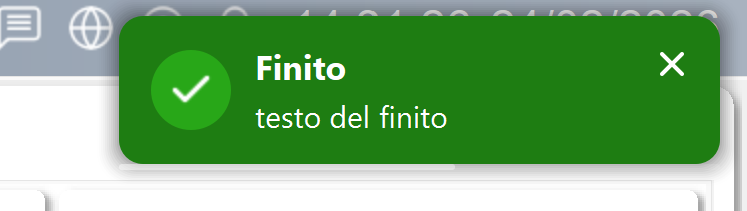
The Toast is a lightweight notification popup that displays temporary messages with icons, subtitles, optional progress bars, and auto-dismiss timers. Multiple toasts stack vertically and are managed by a centralized queue.
Key Features
Preset Types
Built-in visual presets for common notification types: Success (green), Error (red), Warning (orange), Info (blue) — each with matching icon, colors, and styling.
Stacking & Queue
Multiple toasts stack vertically from any screen edge. A MaxToasts property limits simultaneous notifications — excess toasts are queued and shown as earlier ones dismiss.
Progress Bar
Optional progress bar showing the remaining auto-dismiss time, giving the operator visual feedback on how long the notification will stay.
Close Button
Optional close button for manual dismissal alongside the auto-dismiss timer.
Main Properties
| Property | Type | Description |
|---|---|---|
Presets_Json |
QString |
JSON preset definitions (colors, icons per type) |
Position |
int |
Screen edge: TopRight, TopLeft, BottomRight, BottomLeft |
MaxToasts |
int |
Maximum simultaneous visible toasts |
Spacing |
int |
Gap between stacked toasts |
ScreenMargin |
int |
Margin from screen edge |
DefaultDuration |
int |
Auto-dismiss delay (ms) |
AnimationDuration |
int |
Slide-in/slide-out animation (ms) |
ShowProgressBar |
bool |
Display countdown progress bar |
ShowCloseButton |
bool |
Display manual close button |
Note: This widget exposes 9 configurable properties plus JSON-based preset customization for unlimited visual variants.
Usage Example in WinCC OA
XML Configuration (extended properties)
<extended>
  <prop name="Position" type="INT">0</prop>
  <prop name="MaxToasts" type="INT">5</prop>
  <prop name="DefaultDuration" type="INT">4000</prop>
  <prop name="Spacing" type="INT">8</prop>
  <prop name="ScreenMargin" type="INT">16</prop>
  <prop name="ShowProgressBar" type="BOOL">True</prop>
  <prop name="ShowCloseButton" type="BOOL">True</prop>
  <prop name="AnimationDuration" type="INT">300</prop>
  <script name="toastClicked">toastClicked(string type, string message)</script>
  <script name="toastDismissed">toastDismissed(string type, string message)</script>
</extended>
CTRL Initialization Script
main()
{
  // Toast is typically a singleton in the main panel
  // Show notifications from anywhere via method calls
}

// Show a success notification
void notifySuccess(string message)
{
  EWO.showToast("success", message);
}

// Show an error with custom title
void notifyError(string title, string detail)
{
  EWO.showToastWithTitle("error", title, detail);
}

// Example: alarm acknowledgment confirmation
void onAlarmAck(string alarmId)
{
  EWO.showToast("success", "Alarm " + alarmId + " acknowledged");
}
Available Signals
| Signal | Parameters | Description |
|---|---|---|
toastDismissed |
type, message |
Toast auto-dismissed or closed |
toastClicked |
type, message |
Toast body clicked |
toastCloseClicked |
type, message |
Close button clicked |
allDismissed |
— | All toasts cleared |