ScreenshotEditor
Annotation Tool with Undo/Redo
The ScreenshotEditor is a complete annotation tool with a polymorphic annotation system — a base class with virtual methods extended by 5 annotation types (Path, Line, Shape, Text, Highlight), undo/redo via command stack, and 9 drawing tools. Operators can capture the current dashboard view and annotate it for reporting, shift handover, or issue documentation.
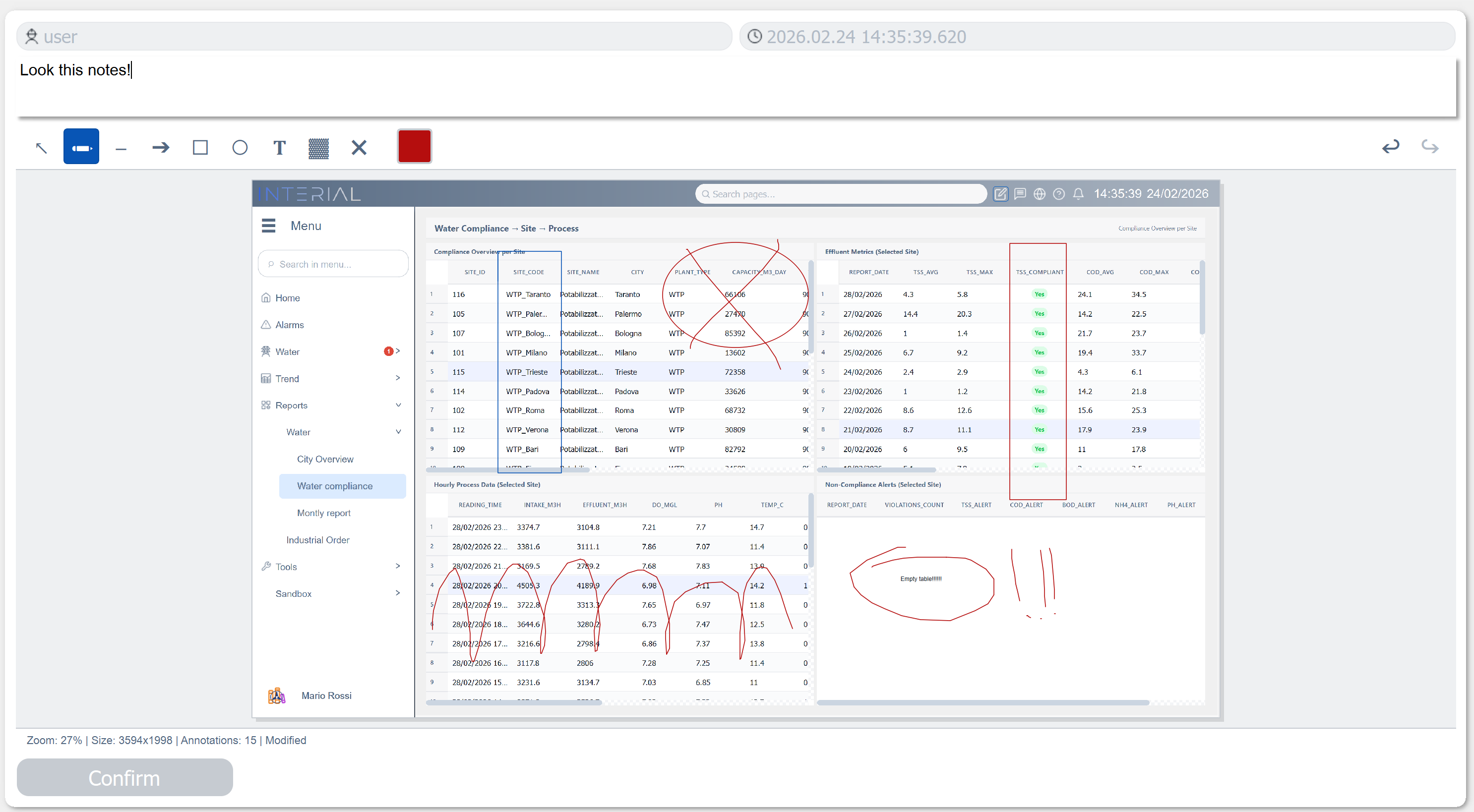
Key Features
9 Drawing Tools
Pen (freehand), Arrow, Line, Rectangle, Ellipse, Text, Highlight (semi-transparent), Eraser, and Selection tool for moving/resizing annotations.
Polymorphic Annotation System
A base Annotation class with virtual paint(), boundingRect(), and hitTest() methods — extended by PathAnnotation, LineAnnotation, ShapeAnnotation, TextAnnotation, and HighlightAnnotation.
Undo/Redo Command Stack
Every annotation action (add, delete, move, resize) is pushed onto a command stack. Full undo/redo support with keyboard shortcuts.
Performance
Mouse events are throttled to 16ms (~60fps) for smooth drawing, and all coordinate transforms (screen to image) account for zoom level.
Main Properties
| Property | Type | Description |
|---|---|---|
Tool_Current |
enum |
Active drawing tool |
Tool_PenWidth |
int |
Pen stroke width |
Tool_LineStyle |
enum |
Solid, Dashed, Dotted |
Tool_FontSize |
int |
Text annotation font size |
Tool_FillShapes |
bool |
Fill rectangles/ellipses |
Color_Pen |
QVariant |
Stroke color |
Color_Fill |
QVariant |
Fill color |
Color_Text |
QVariant |
Text annotation color |
Color_Highlight |
QVariant |
Highlight overlay color |
Image_Path |
QString |
Source image file path |
Image_Zoom |
double |
Current zoom level |
UI_ToolbarVisible |
bool |
Show/hide toolbar |
UI_GridVisible |
bool |
Show alignment grid |
Note: This widget exposes 24 configurable properties. The table above covers only a selection — more are available for fine-tuned control over colors, fonts, canvas, and toolbar appearance.
Usage Example in WinCC OA
XML Configuration (extended properties)
<extended>
  <prop name="Color_Pen" type="COLOR">{220,53,69}</prop>
  <prop name="Tool_PenWidth" type="INT">3</prop>
  <prop name="UI_ToolbarVisible" type="BOOL">True</prop>
  <prop name="UI_StatusBarVisible" type="BOOL">True</prop>
  <prop name="Color_ToolbarBackground" type="COLOR">{45,50,62}</prop>
  <script name="imageSaved">imageSaved(string path)</script>
  <script name="base64Ready">base64Ready(string base64)</script>
</extended>
CTRL Initialization Script
main()
{
  // Load screenshot from dollar parameter
  if (isDollarDefined("$DP_ImagePath"))
  {
    EWO.loadImage($DP_ImagePath);
  }
}

// Save annotated image
void saveAnnotation()
{
  string path = "C:/WinCC_OA_Proj/screenshots/" + formatTime("%Y%m%d_%H%M%S", getCurrentTime()) + ".png";
  EWO.saveImage(path);
}
Available Signals
| Signal | Parameters | Description |
|---|---|---|
imageLoaded |
path |
Image successfully loaded |
imageSaved |
path |
Annotated image saved to disk |
toolChanged |
tool |
Active tool switched |
annotationAdded |
— | New annotation created |
annotationDeleted |
— | Annotation removed |
annotationSelected |
index |
Annotation clicked for editing |
zoomChanged |
zoom |
Zoom level changed |
undoAvailable |
available |
Undo stack state changed |
redoAvailable |
available |
Redo stack state changed |
modified |
isModified |
Document dirty flag changed |
base64Ready |
base64 |
Base64 export ready |